Why Your Vending Machine Network Connection Is the Backbone of Your Business
A reliable vending machine network connection is what separates a profitable machine from an expensive box that collects dust. Without it, cashless payments fail, telemetry goes dark, and you're driving to locations blind.
Here's a quick summary of your main connectivity options:
| Connection Type | Best For | Key Risk |
|---|---|---|
| Cellular (4G LTE / LTE-M) | Most deployments, any location | Carrier dead zones |
| Multi-carrier SIM | High-uptime requirements | Higher monthly cost |
| Wi-Fi (host site) | Low-cost indoor locations | IT restrictions, PCI issues |
| Wired Ethernet (LAN) | Fixed indoor locations | No control if host network fails |
The fast answer: For most operators, a dedicated cellular connection — ideally with multi-carrier SIM failover — is the most reliable and secure choice. It keeps you off the host's network, protects payment data, and lets you monitor machines remotely.
Cashless payments now make up 70% of vending transactions, and the average card transaction runs 37% higher than cash. That means every minute your machine is offline is real, measurable lost revenue.
The problem isn't just full outages. Small, intermittent drops — a carrier blip, a congested Wi-Fi network, a machine stuck in a basement — are what quietly bleed operators dry. And if you're managing dozens of machines across multiple locations, connectivity isn't a side concern. It's your entire operation.
I'm Manuel Mojica, founder of Vending Circle and a former Cyber Operations Officer in the US Air Force — experience that gives me a practical lens on both vending operations and the security side of vending machine network connections. In this guide, I'll walk you through everything you need to know to keep your machines online, your payments secure, and your truck rolls to a minimum.
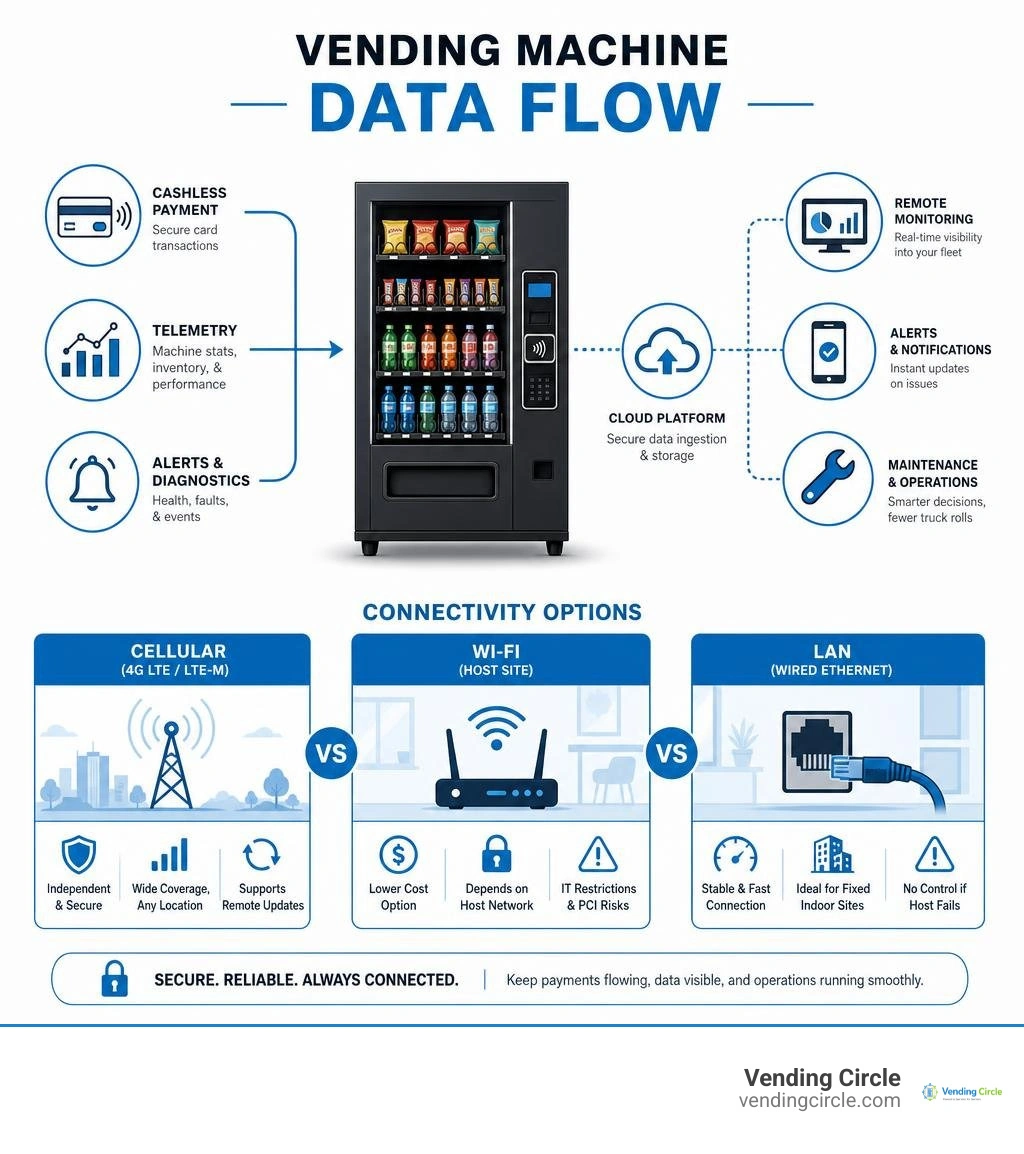
Choosing the Right Vending Machine Network Connection
When deploying a new machine, one of your first operational decisions is how to hook it up to the internet. While it is tempting to look for a "free" local option, relying on a host site's infrastructure often introduces more headaches than it saves. Let's break down the three primary methods we use to establish a vending machine network connection.
1. Cellular Connectivity (The Industry Standard)
For the vast majority of modern operators, cellular is the undisputed king. Whether you use a compact LTE-M modem for basic telemetry or a robust 4G LTE Cat 4 router for interactive kiosks, cellular gives you complete independence.
- Pros: Complete physical and logical control; plug-and-play deployment; zero negotiation with host-site IT departments; easily secures payment traffic.
- Cons: Monthly data subscription costs; potential signal shielding in steel-reinforced buildings or deep basements.
2. Local Wi-Fi
Connecting to the host site's Wi-Fi network is a common route for beginners looking to save on monthly data fees. However, this is rarely a viable long-term strategy for commercial operations.
- Pros: Low-to-zero direct monthly cost.
- Cons: Highly insecure; connection speeds fluctuate based on public user volume; guest networks often require web-portal logins that headless vending hardware cannot navigate; zero control when the host changes their password or updates their router.
3. Wired Ethernet (LAN)
Plugging a physical Ethernet cable directly from the machine's internal controller or payment terminal into the host's wall jack provides a highly stable, high-speed connection.
- Pros: Exceptional stability; immune to wireless signal interference or physical shielding.
- Cons: Requires physical proximity to an active network port; requires permission from the host's IT department (which is almost always rejected due to security policies); completely dependent on the host's ISP staying online.
As highlighted in our comprehensive breakdown of Vending Machine Industry Statistics 2026, the rapid shift toward smart retail means your connection choice directly impacts your bottom line. Relying on a client's local internet connection can be incredibly risky. In fact, the operational cost of just a single host-network failure — including lost sales, customer frustration, and the labor cost of sending a technician to investigate — can easily offset the cost of maintaining a dedicated, independent cellular connection for three full years.
How Cashless Payments and Telemetry Transmit Data
To build a reliable network strategy, we must first understand what our machines are actually saying to the cloud. A smart vending machine does not just process payments; it runs a constant, silent dialogue of operational telemetry.
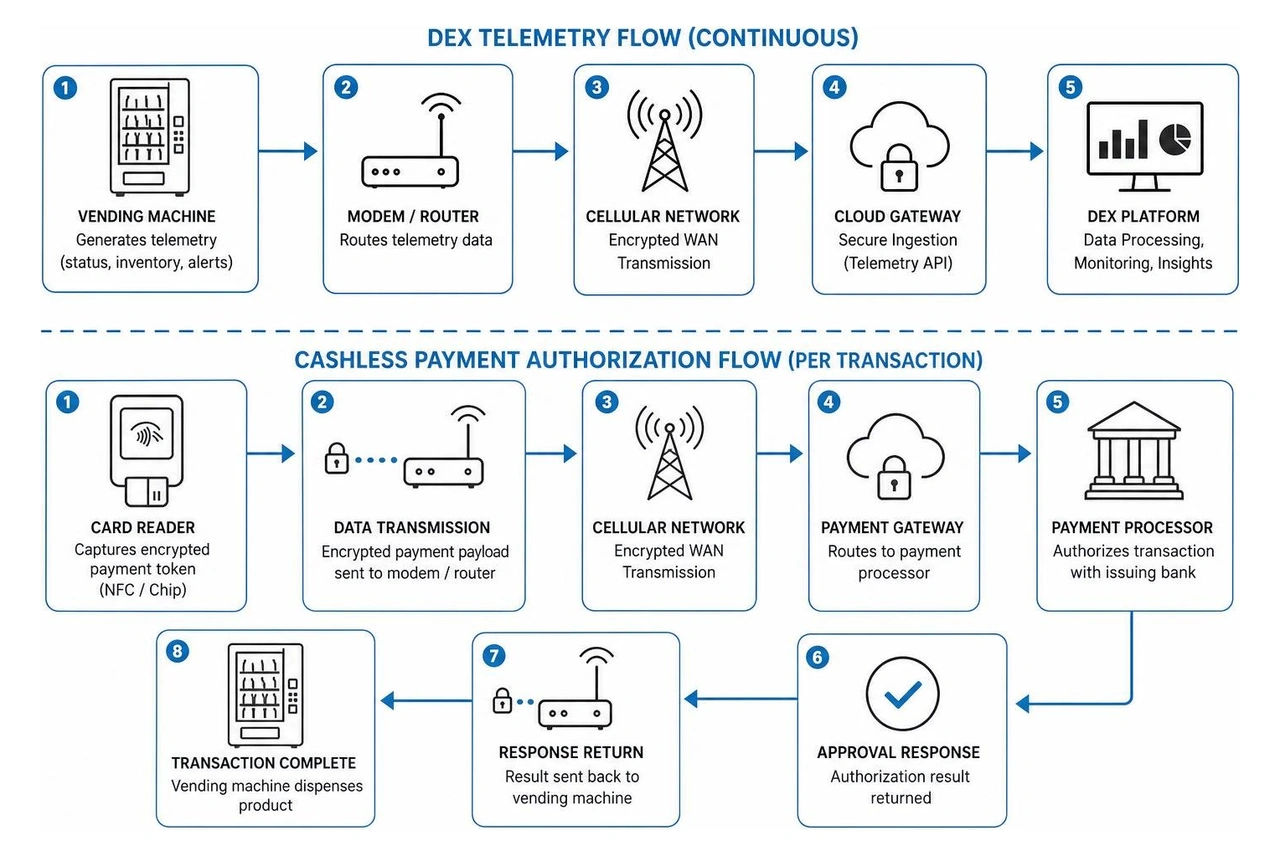
The Cashless Transaction Flow
When a customer taps their phone or dips an RFID-enabled card at your reader, a highly coordinated sequence occurs in a matter of milliseconds:
- The Card Reader: Captures the encrypted payment token via NFC or chip reader.
- Data Transmission: The reader routes this encrypted payment payload to the internal modem or router.
- The Gateway: The data travels via an encrypted cellular Wide Area Network (WAN) directly to the payment processor.
- Authorization: The processor verifies funds, sends an approval code back to the machine, and the controller releases the product.
Telemetry and the DEX Protocol
Behind the scenes, your machine also monitors its own physical health and inventory. This is done using the DEX (Data Exchange) and UCS (Universal Cashless Specification) protocols. Every few hours (or in real time, depending on your setup), the machine transmits a DEX file to your Vending Management System (VMS).
This file contains granular details: exactly how many cans of soda are left in slot 12, the internal compressor temperature, and whether there are any coin jams. Utilizing a smart platform like the Management system for the vending and coffee industry - Vendon allows operators to analyze this data to schedule remote price changes, plan efficient restocking routes, and perform remote reboots to clear minor software glitches without ever leaving the office.
Real-World Data Consumption
A common misconception is that smart vending machines require massive, expensive data plans. In reality, vending is an incredibly low-bandwidth workload. Here is how typical monthly data usage breaks down:
- Basic DEX Telemetry Only (Sent every 1–4 hours): 1 to 3 MB per month.
- Standard Cashless Authorization + Telemetry: 3 to 10 MB per month.
- Continuous Real-Time Telemetry (1-minute intervals): 10 to 30 MB per month.
- Smart Lockers / Parcel Lockers (with remote door control): 20 to 100 MB per month.
- Machines with Dynamic Video Advertising Screens: 500 MB to 2 GB per month.
For standard operations, a tiny, low-cost cellular plan is more than enough. If you want to learn how to properly configure these telemetry systems and match them with the right hardware, check out our expert-led vending machine courses.
Network Isolation and Security for Vending Deployments
If you are forced to connect your equipment to a host's local network — such as an industrial vending machine dispensing safety gear inside a corporate facility — you will immediately run into IT security pushback. Corporate IT administrators are deeply protective of their networks, and for good reason. They do not want a third-party vending machine acting as an unmonitored backdoor for hackers to access sensitive company files.
To bypass this friction and protect your own transaction data, you must implement strict network isolation and security protocols.
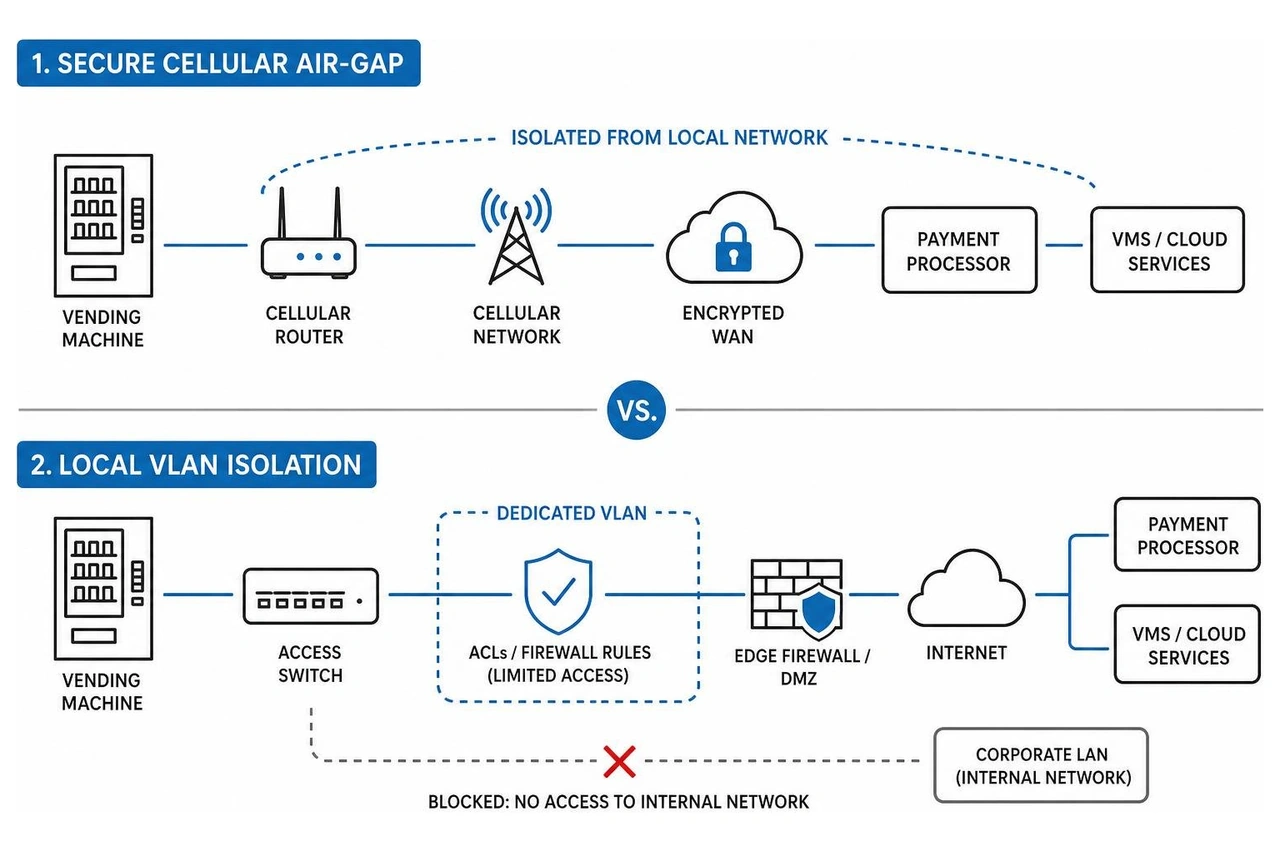
Local Network Isolation (VLANs and DMZs)
If you must use the host's physical LAN, work with their network administrator to configure the following:
- Dedicated VLAN (Virtual Local Area Network): Place the vending machine on its own isolated virtual network, completely segregated from the host's corporate traffic.
- Access Control Lists (ACLs): Apply strict firewall rules that prevent the vending machine's IP address from communicating with any other internal IP addresses on the local network.
- DMZ (Demilitarized Zone): Configure the firewall to treat the vending port as an external, untrusted entity, allowing it to talk only to the public internet.
The Ultimate Isolation: The Cellular Air-Gap
The simplest and most secure solution is to avoid the host's network altogether. By utilizing an independent cellular router, you create a physical "air-gap." The vending machine's payment and telemetry traffic never touches the host's local infrastructure, eliminating security concerns for both parties.
To secure this cellular link, professional operators utilize:
- Private APNs (Access Point Names): A private APN ensures your cellular modems communicate over a private wireless gateway rather than the public internet.
- VPN Tunnels: Outbound-only Virtual Private Network tunnels encrypt all data traveling from the machine to your payment processor, ensuring no public-facing IP addresses are exposed to hackers.
- PCI-DSS Compliance: Ensure your cashless hardware uses Point-to-Point Encryption (P2PE). This ensures primary account numbers (PAN) are encrypted directly at the card reader, meaning clear-text payment data never travels through your local router or machine controller.
For secure, pre-configured SIM cards designed specifically for these high-security environments, we recommend exploring IoT SIM for vending machines - telemetry, contactless payments and field service | iot.cards . Additionally, you can read about how operators successfully deploy independent networks in highly restricted environments in this Connectivity for unattended vending kiosks | Robustel Case Study .
Maximizing Uptime with Multi-Carrier Failover and Managed IoT
In the vending business, downtime is a silent killer. If a machine goes offline in a busy hospital breakroom on a Friday night, you might not notice until Monday morning — resulting in days of lost revenue and frustrated customers.
To achieve maximum uptime, professional fleets rely on two key technologies: multi-carrier SIMs and managed IoT connectivity.
Multi-Carrier SIMs and Dual-SIM Failover
A standard consumer SIM card is locked to a single carrier (like AT&T or T-Mobile). If that carrier experiences a local tower outage or signal degradation inside a concrete building, your machine goes offline.
A multi-carrier IoT SIM, however, is network-agnostic. It constantly monitors local signal quality (RSRP) and can automatically switch to the strongest available network provider in seconds. If a primary carrier drops, dual-SIM failover routers immediately route traffic through a secondary backup network, ensuring your payment terminals remain online.
Managed vs. Self-Managed Connectivity
As your business grows, you must decide how to manage your network hardware and data plans:
- Self-Managed Solutions: You buy generic cellular routers, source your own SIM cards, negotiate individual carrier contracts, and handle your own firmware updates and troubleshooting. While this can offer slightly lower monthly costs for highly tech-savvy operators, it is incredibly resource-intensive and distracts from core operations.
- Managed IoT Connectivity: You partner with a dedicated provider who supplies pre-configured, plug-and-play routers with bundled multi-carrier data plans. They handle 24/7 remote monitoring, push automated security updates, and provide specialized support.
By utilizing managed solutions, operators can virtually eliminate unnecessary "truck rolls" — the highly expensive physical dispatch of a technician just to perform a manual power cycle on a frozen router. A single unnecessary truck roll can easily cost $60 to $100 in fuel and labor. Managed systems allow you to diagnose, reboot, and configure your connections remotely.
To see how multi-network roaming can protect your business from local carrier congestion and signal drops, check out Multi-Carrier Vending Connectivity for Reliable Operations | POND IoT . For a deeper look at industrial-grade hardware setups, review the Smart Vending Connectivity Case Study | Reliable Cellular IoT Solutions | Millbeck . Finally, to understand how a major operator scaled rapidly while maintaining maximum uptime, read the Case Study: Three Square Market Vending .
Scaling Your Vending Fleet Connectivity
When you are managing two or three machines, keeping them connected is simple. But when you scale to dozens, hundreds, or thousands of units, connectivity becomes a complex logistics puzzle. Without a standardized, disciplined approach, you will quickly find yourself buried in network troubleshooting and runaway data bills.
When scaling your fleet, keep these critical considerations in mind:
- Standardize Your Hardware: Do not mix and match cheap consumer-grade dongles and routers. Standardize on a single, industrial-grade router model across your entire fleet. This makes installation, troubleshooting, and field technician training highly repeatable.
- Set Hard Data Caps: A broken firmware update or a software loop on a smart screen can cause a machine to go haywire, multiplying its data usage by 100x overnight. Ensure your IoT data plans feature automatic alerts at 70%, 80%, and 90% capacity, with a hard block at 100% to prevent massive, unexpected billing surprises.
- Map Signal Strength Before Installation: Never place a machine blindly. Have your installation team perform a quick signal check of all major carriers at the exact physical spot where the machine will sit.
- Utilize Centralized Device Management: Use a unified cloud dashboard to monitor the online status, signal strength, and data consumption of every single SIM and router in your fleet from one screen.
Scaling a business comes with plenty of operational hurdles. If you want to avoid expensive trial-and-error, we highly recommend finding an experienced operator to guide you. Learn more about fast-tracking your growth in our guide on How to Find a Vending Machine Mentor.
Forums and communities are also invaluable as you grow. If you are comparing your options, read our analysis of Vending Circle vs Facebook Groups Forums and Paid Vending Machine Community vs Free Forums to see why a dedicated, professional space makes all the difference.
Frequently Asked Questions about Vending Connectivity
How much data does a standard vending machine network connection use?
For a standard vending machine processing cashless payments and sending basic DEX telemetry every few hours, data usage is incredibly low — typically between 3 and 10 MB per month. If your machine features a high-resolution touch screen that pulls remote video advertisements or interactive content, that usage can climb to between 500 MB and 2 GB per month.
Why does a vending machine network connection fail in indoor locations?
Indoor signal failure is usually caused by physical shielding. Vending machines are frequently placed in the core of large buildings, basements, or steel-reinforced breakrooms that block high-frequency cellular signals. To solve this, operators use specialized LTE-M connections (which penetrate deep indoors much better than standard 4G) or install low-profile, external magnetic antennas on top of the vending cabinet to bypass the metal enclosure's shielding.
Can I connect a vending machine to a host's local Wi-Fi?
Technically yes, but we strongly advise against it. Host-provided Wi-Fi is highly unreliable, frequently suffers from password changes, and rarely complies with the strict security standards required for PCI-compliant credit card processing. Furthermore, corporate IT departments are highly resistant to allowing third-party devices onto their networks due to security risks.
Conclusion
At the end of the day, your vending machine network connection is the literal lifeline of your business. It is what keeps the cash flowing, the inventory tracked, and your operational costs low. By investing in dedicated, secure, and resilient cellular connections, you protect your revenue and save yourself countless hours of manual troubleshooting.
If you are ready to take your vending business to the next level, you do not have to figure it all out on your own. At Vending Circle, we have built the ultimate combined learning and procurement platform for operators.
When you join our community, you get access to weekly live Q&As, expert-led courses, and exclusive, manufacturer-direct pricing on top-tier equipment. Whether you are looking to buy your very first vending machines or seeking to optimize a massive fleet, we are here to help you scale smarter. Explore What is Vending Circle today and join a network of active operators who are building the future of unattended retail.