Why a Vending Cashless Reader Is Now Essential
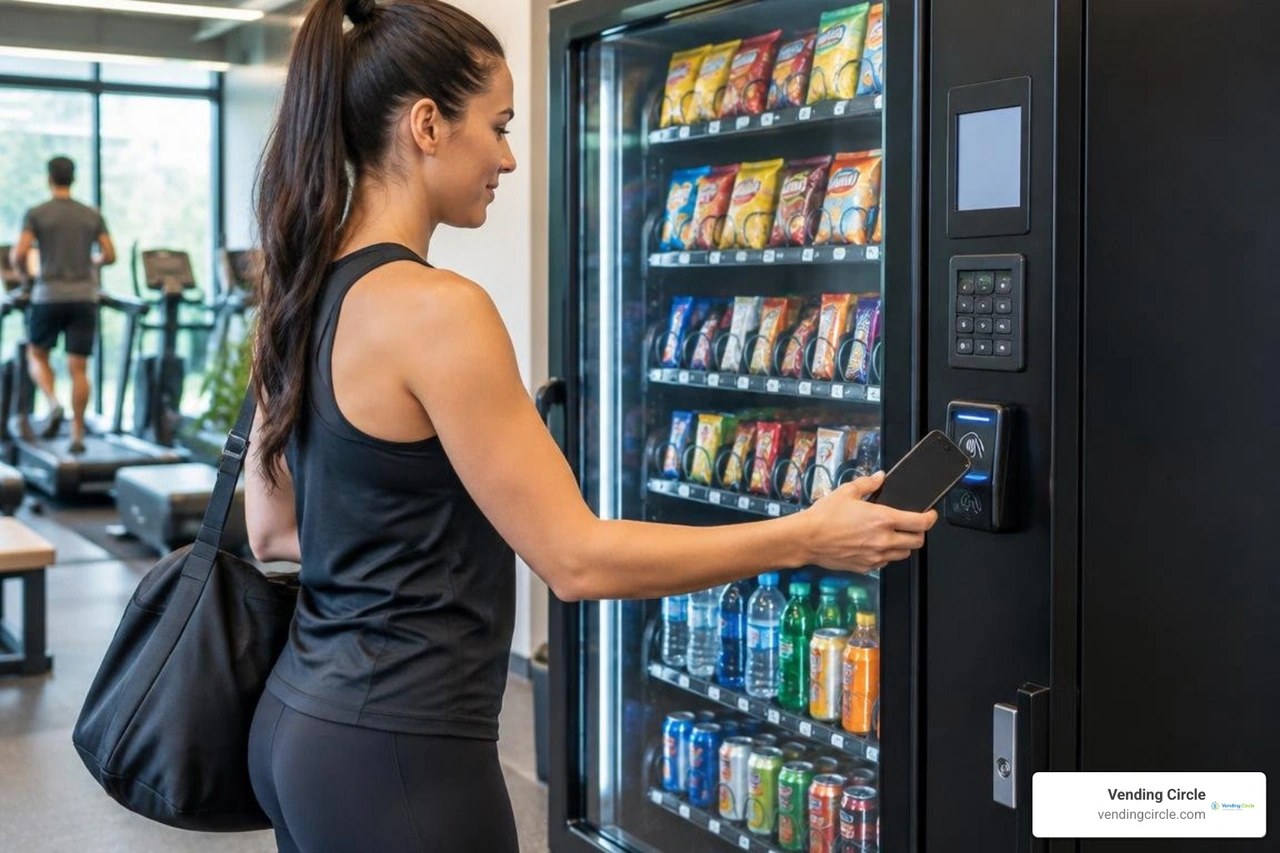
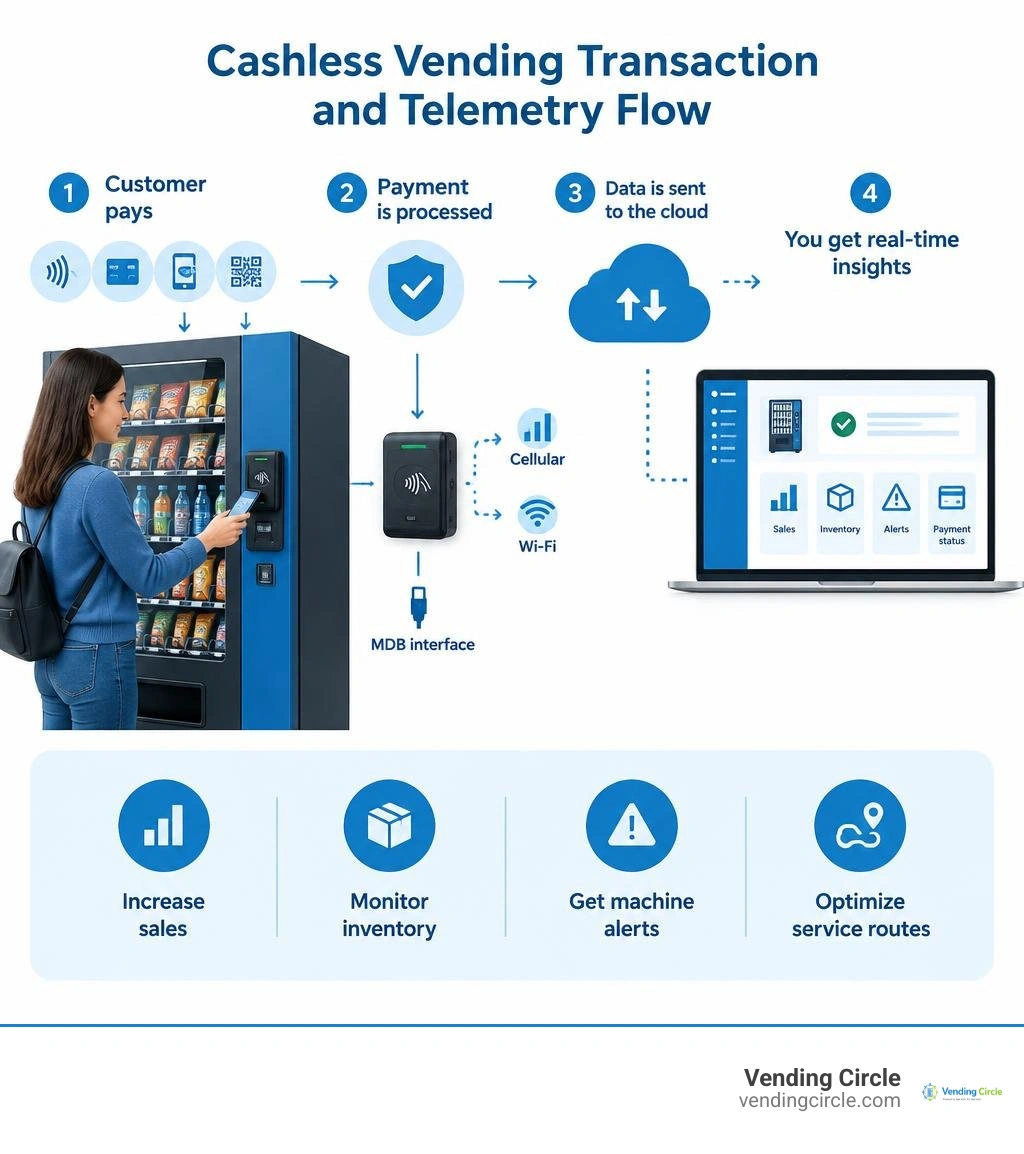
A vending cashless reader lets customers pay by tap, chip card, mobile wallet, or sometimes QR code, while sending payment and machine data to your management platform. For operators, that means fewer lost sales from customers without cash, less time handling coins and bills, and better visibility into what each machine needs.
The best readers do more than approve a transaction. Connected through an MDB interface and cellular or Wi-Fi connection, they can report sales, inventory trends, machine alerts, and payment status in near real time. That gives you a practical way to adjust prices remotely, plan tighter service routes, and refill machines before empty slots cost you sales.
Cashless does come with hardware, connectivity, and processing fees. But in locations where people expect to tap a card or phone - such as medical facilities, apartment buildings, gyms, and multi-shift warehouses - the added convenience can make the upgrade easier to justify.
I am Manuel Mojica, founder of Vending Circle and an operator who has built and supported vending businesses through MM Healthy Vending. My experience in vending operations and cybersecurity helps me evaluate a vending cashless reader not just as a payment device, but as a secure tool for running a more reliable, profitable route.
Quick vending cashless reader definitions:
- credit card swipe vending machine
- how do vending machine credit card readers work
- vending card readers
How a Vending Cashless Reader Works and Connects to Your Machine
To understand why modern readers perform so reliably, it helps to look at what happens behind the machine's front panel. At the heart of every automated retail system is the Vending Machine Controller (VMC). The VMC serves as the central brain, governing motor movements, drop sensors, temperature controls, and payment acceptance.
When you begin adding a card reader to a vending machine, the device bridges the machine's internal computing architecture with banking networks. Communication between the card terminal and the VMC relies on the industry-standard Multi-Drop Bus (MDB) protocol. Standardized by the National Automatic Merchandising Association (NAMA) and the European Vending & Coffee Service Association (EVA), MDB acts as an internal local area network, allowing bill validators, coin changers, and cashless readers to talk directly to the VMC without signal collisions.
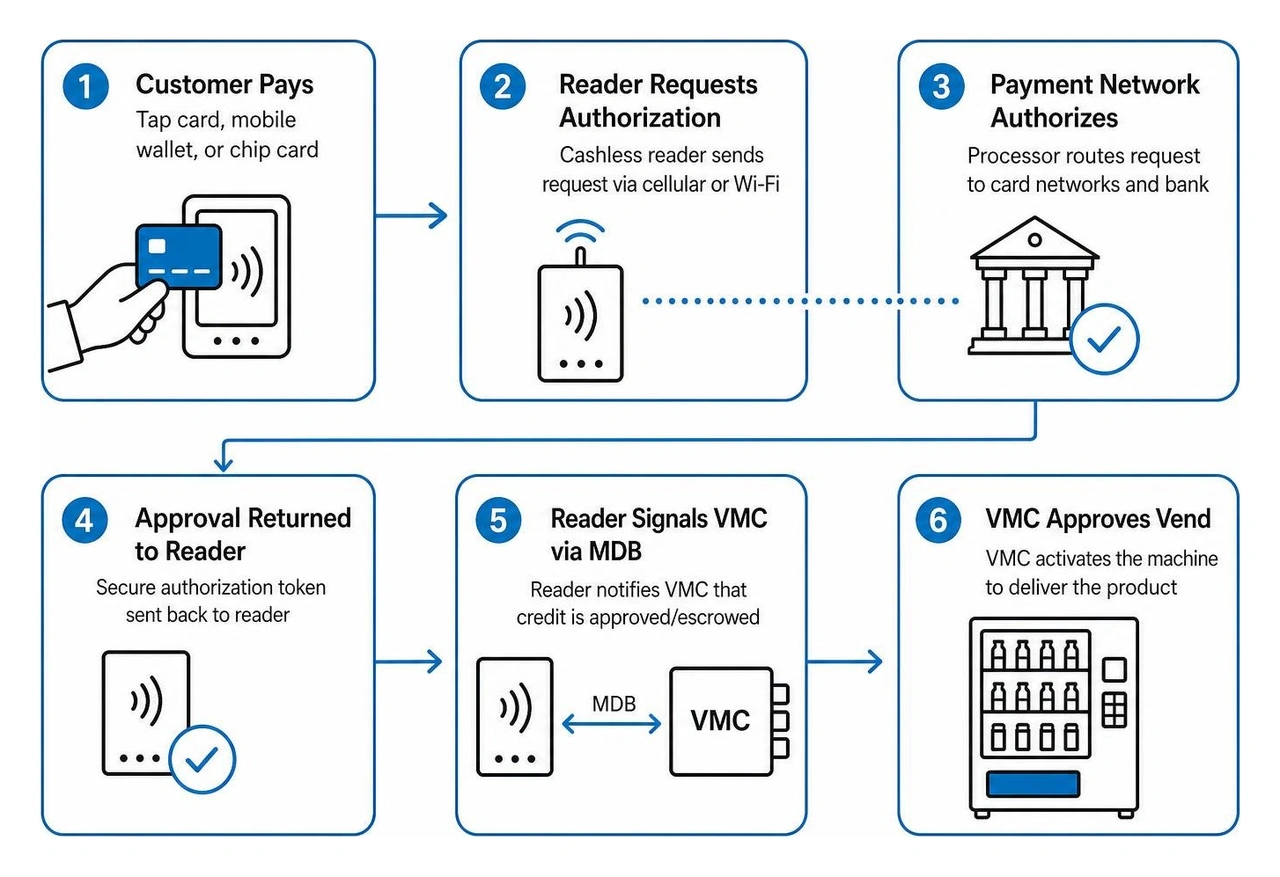
The moment a customer initiates a purchase, a structured series of digital handshakes takes place:
- Credit Request: The customer interacts with the terminal (tapping a card or phone). The cashless device sends an authorization request through its internal cellular modem (typically 4G LTE) to the merchant processing gateway.
- Bank Authorization: The processor routes the transaction through payment card networks (Visa, Mastercard, American Express, or private campus loops) to verify available funds.
- Escrow & VMC Signaling: Once approved, the gateway transmits a secure token back to the reader. The reader alerts the VMC via the MDB harness that credit has been established (for example, a $5.00 pre-authorization hold).
- Product Selection & Dispense: The customer selects their item on the machine keypad or touchscreen. The VMC directs the corresponding coil or belt motor to turn.
- Drop Sensor Confirmation: The internal drop sensor verifies the product fell into the retrieval bin.
- Settlement: The VMC signals the cashless reader via MDB that the vend succeeded, locking in the exact purchase amount. The reader relays the final total to the payment processor, closing the transaction and emailing or updating the cloud telemetry dashboard instantly.
Payment Processing Mechanics: Tap, Chip, and NFC Wallets
Consumer payment preferences have shifted rapidly toward frictionless tap-and-go interactions. Today, a modern terminal for contactless payment and ticketing must accept a diverse range of payment methods to capture every possible sale:
- Contactless NFC (Near Field Communication): Operates at 13.56 MHz (ISO/IEC 14443 Type A/B), allowing cardholders to tap credit or debit cards within a few centimeters of the terminal surface.
- Mobile Digital Wallets: Services such as Apple Pay, Google Pay, and Samsung Pay communicate via NFC, using device-level biometric verification (Face ID or fingerprint) and tokenization to conceal the underlying card number.
- EMV Chip & Magstripe: Contact-based EMV slots read the integrated circuit chip on payment cards, generating a unique cryptogram for every transaction. Many terminals also retain a magnetic swipe track for legacy cards.
- Dynamic & Static QR Codes: Terminals equipped with integrated cameras or graphical screens can render dynamic QR codes, letting users scan with proprietary payment apps, international digital wallets (such as WeChat Pay and Alipay), or localized loyalty systems.
Hardware Installation, MDB Interfaces, and Connectivity
Installing a modern cashless reader is typically a straightforward, plug-and-play process for any machine equipped with an MDB-compliant control board (MDB version 2.0 or higher).
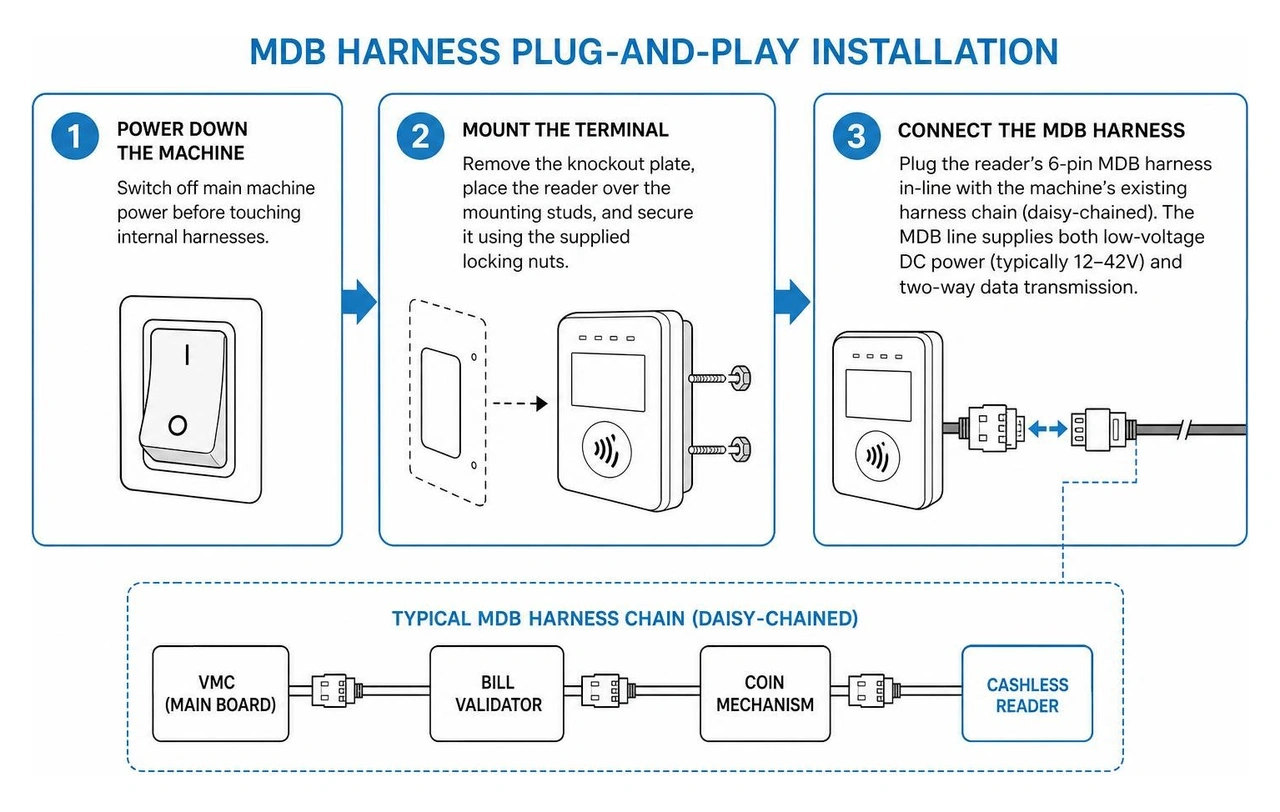
The installation process generally follows five core steps:
- Power Down the Machine: Always switch off main machine power before touching internal harnesses to avoid blown fuses on the control board.
- Mount the Terminal: Most cashless units match standard EVA mounting dimensions. Remove the knockout plate on the front fascia of your machine, place the reader over the mounting studs, and secure it using the supplied locking nuts.
- Connect the MDB Harness: Plug the reader's 6-pin MDB harness in-line with the machine's existing harness chain (usually daisy-chained between the main board, bill validator, and coin mechanism). The MDB line supplies both low-voltage DC power (typically 12–42V) and two-way data transmission.
- Route the External Antenna: Position the magnetic or screw-mount high-gain cellular antenna at the top exterior of the vending cabinet. Avoid placing the antenna inside a solid metal cabinet, as thick steel walls can attenuate cellular signals and cause transaction timeouts.
- Network Provisioning: Power the machine back on. The terminal will establish a secure vending machine network connection over 4G LTE, download network settings, and flash a green indicator or display an idle prompt when it is ready to vend.
Types of Cashless Payment Systems and Architecture
Cashless readers for unattended retail fall into two major categories: open-loop systems and closed-loop systems. Choosing the right setup depends entirely on where your machines are installed.
| Feature / Metric | Open-Loop Systems (Commercial) | Closed-Loop Systems (Private Sites) |
|---|---|---|
| Primary Media | Visa, Mastercard, Amex, Apple Pay, Google Pay | MIFARE Cards, RFID badges, student IDs, key fobs |
| Target Locations | Public venues, transit hubs, open office complexes | Corporate campuses, universities, closed factories |
| Processing Fees | Standard interchange + gateway rates (2.5%–5%) | Minimal internal balance fees; zero merchant interchange |
| Hardware Example | Universal Cellular Card Reader | Dedicated RFID / Campus Reader |
| Internet Need | Continuous 4G LTE/Wi-Fi connection | Periodic batch sync or private local network |
Choosing the Right Vending Cashless Reader Hardware Architecture
Selecting the best hardware design depends on your machine's environment and daily foot traffic.
- Vibrant Touchscreen Terminals: Devices featuring full-color touchscreens (often 2.4" to 3.5" reinforced Gorilla Glass) allow operators to implement multi-vend selections, display product nutritional facts, run screen promotions, and support laddered pricing (offering discounts for buying two or three items at once).
- Compact & Headless Readers: For machines with tight physical clearances, ultra-slim tap-only readers mount directly on the faceplate, while the processing brain sits securely inside the cabinet.
- PIN-on-Glass Terminals: High-security terminals allow customers to enter banking PINs directly onto a certified touch display. This prevents card declines caused by regional payment regulations (such as SCA in Europe) requiring PIN entry after repeated contactless transactions.
- Ruggedized Outdoor Housings: Outdoor vending demands payment terminals with IP65 or higher waterproof ratings, UV-resistant polycarbonate casings, and wide operating temperature tolerances (-30°C to +70°C) to handle extreme seasonal weather. Advanced connected payment readers for vending machines are engineered specifically to thrive under harsh external conditions.
Payment Gateways vs. Direct Integrated Merchant Solutions
When setting up cashless accounts, operators face a choice between all-in-one payment gateways and direct integrated merchant setups.
- Turnkey Payment Gateways: The fastest option for small to mid-sized operators. The hardware vendor acts as the merchant aggregator, handling card associations, banking compliance, and daily payouts. You receive one consolidated deposit into your checking account, minus processing and service fees.
- Integrated Merchant Accounts: Larger route operators with high monthly transaction volumes often prefer direct merchant integrations. While setup takes longer and requires custom underwriting, routing payments directly through a merchant acquiring bank unlocks lower interchange processing costs and granular reporting tailored to high-volume fleets using dedicated vending card readers.
Ongoing Costs, Fee Structures, and Security Standards
Budgeting for cashless operations requires accounting for upfront equipment expenses alongside recurring operational fees. For a complete financial breakdown across hardware lines, review our vending machine costs guide.
Deciphering Monthly Subscriptions and Transaction Fees
To keep your route profitable, pay close attention to the fee mechanics outlined in our vending machine pricing guide:
- Monthly Telemetry & Connectivity Fees: Ranging from $8 to $12 per month per machine, this fee covers 4G LTE cellular data plans, cloud dashboard access, remote firmware patching, and automated inventory sync.
- Transaction Fees (Interchange + Assessment): Most payment processors charge a blended rate between 2.5% and 5% plus a fixed transaction fee (often $0.05 to $0.10 per vend). Because a $1.50 snack purchase carries a higher percentage cost under a fixed-fee model, many operators use transaction batching or incremental authorization, grouping multiple vends made within a short window into a single clearing event.
- Card Surcharging / Two-Tier Pricing: Many operators pass processing expenses along by using dual-pricing settings on their machines (for example, charging $2.00 for cash purchases and $2.15 for card/mobile transactions).
Verifying Payment Security: PCI-DSS, P2PE, and EMV Compliance
Security at unattended retail points is critical. Unattended card readers can be targets for physical tampering or data sniffing if not properly protected.
- PCI-DSS Level 1 Certification: The Payment Card Industry Data Security Standard mandates strict network firewalls, encrypted data storage, and regular security vulnerability assessments.
- Point-to-Point Encryption (P2PE): Advanced readers immediately encrypt card data inside a tamper-resistant hardware security module (HSM) the instant a customer taps or inserts their card. The vending machine controller never sees or stores raw card numbers, shielding operators from major compliance liabilities.
- Anti-Tamper & Removal Detection: Certified readers include internal sensors that immediately shut down the device and alert your cloud management portal if the terminal is pried open or mechanically manipulated.
Strategic Benefits: Revenue Growth, Telemetry, and Placement ROI
Adding a modern cashless reader delivers advantages that extend far beyond simply processing payments. When you buy a vending machine with card reader already installed, you equip your business with a complete remote operating system.

Upgrading Route Telemetry with a Vending Cashless Reader
Unattended retail operations succeed or fail based on logistics efficiency. A cellular-connected reader acts as a smart gateway, powering a full Vending Management System (VMS):
- Dynamic Pre-Kitting: Instead of loading your delivery van with random stock and guessing what each machine needs, telemetry allows you to generate exact picklists at your warehouse. You pack precisely what sold, cutting restocking labor in half.
- Remote Price Updates: If ingredient or wholesale product costs rise, you can adjust item prices across your entire fleet via your cloud portal in seconds—eliminating the need to visit every machine in person to reprogram the keypad.
- Machine Health & Temperature Alerts: Receive immediate SMS or email notifications if a machine compressor fails, a bill jam occurs, or an internal health safety sensor triggers, preventing spoiled refrigerated inventory and lost revenue.
Maximizing ROI Across High-Yield Location Types
Cashless readers perform exceptionally well in captive locations where customers want immediate snacks or drinks but rarely carry cash:
- Medical & Outpatient Clinics: Hospital corridors, staff break rooms, and waiting areas generate strong around-the-clock volume. Healthcare workers and visitors value quick contactless tap-and-go options for late-night energy drinks, clean snacks, and over-the-counter essentials.
- Multi-Shift Manufacturing & Logistics Warehouses: In facilities running 24/7 operations with 150+ staff members, scheduled 15-minute breaks demand lightning-fast checkout speeds. Cashless terminals process payments in seconds, keeping break lines moving smoothly.
- Class-A Residential Apartment Complexes: Modern apartment mailrooms, tenant lounges, and clubhouse fitness centers host tech-savvy residents who rely entirely on mobile wallets. Placing machines in visible, high-traffic corridors produces steady, high-margin monthly sales.
Frequently Asked Questions About Vending Cashless Readers
Can I install a cashless reader on older vending machines?
Yes. If your older machine uses an MDB-compatible control board (found on most models built after the late 1990s), you can connect a cashless reader directly. If you are operating a legacy non-MDB machine (such as an older pulse or single-price unit), you can install an MDB conversion kit or upgraded universal control board to make the machine fully compatible with modern cashless systems.
How much revenue increase can an operator expect after going cashless?
Operators typically observe a 25% to 40% boost in overall gross revenue after upgrading cash-only machines to cashless readers. This jump is driven by capturing impulse buyers who do not carry cash, facilitating multi-vend transactions, and allowing higher-priced premium selections (like protein bars, cold-brew coffee, and electronics) that exceed traditional bill-acceptor limits.
What happens if the vending machine loses cellular connection during a sale?
Modern cashless readers use offline transaction caching and store-and-forward protocols. If a temporary network interruption occurs, the reader evaluates local card cryptograms, authorizes low-risk vend amounts up to a preconfigured limit, and stores the transaction data in encrypted memory. As soon as cellular connectivity returns, the reader transmits the pending authorizations to the banking gateway for settlement.
Conclusion
Upgrading your machines with a modern cashless reader is one of the most reliable ways to modernize your route, capture impulse purchases, and build a more efficient vending business. Pairing contactless payment acceptance with cloud-based telemetry gives you the real-time data needed to streamline restocking, optimize pricing, and eliminate unnecessary service trips.
If you are ready to expand your route or upgrade your equipment, explore our verified lineup of commercial vending machines to find hardware built for modern cashless operations. At Vending Circle, our mission is to provide operators with practical resources, reliable supplier pricing, and active community insights to help your vending business grow.